

Switching HOA software involves migration, training, and implementation risk. But staying with an outdated platform can create its own costs through manual work, additional staffing, disconnected data, limited financial visibility, and reduced capacity to scale. Management companies should evaluate both sides of that equation before deciding whether to stay or switch.
What Is the Real Cost of Not Switching HOA Software?
Why growing HOA management companies should evaluate the operational and financial risk of staying with technology they’ve outgrown.
If your portfolio doubled tomorrow, what would break first?
Would accounting need more people?
Would managers need more administrative support?
Would reporting become harder?
Would onboarding slow down?
Would leadership lose visibility across the portfolio?
Would the number of spreadsheets, manual processes, and workarounds increase?
Your team probably already knows the pressure points.
It’s the spreadsheet someone created three years ago that somehow became part of the accounting process.
It’s the report that still needs to be exported and rebuilt before leadership sees it.
It’s the manager who knows which three systems to check before answering a board member’s question.
It’s the employee everyone asks because they’re the only person who knows how a particular process actually works.
None of these things looks like a major technology problem on its own.
Together, they tell a different story.
As an HOA management company grows, inefficient technology rarely fails all at once. Instead, the organization quietly compensates for it.
The software still technically works.
But the business is working harder because of it.
Eventually, the question is no longer:
Does our HOA software work?
The better question is:
Can our technology support where we intend to take this company?
The Cost of Staying Doesn’t Appear on an Invoice
The cost of switching HOA software is relatively easy to see.
Implementation has a price. Training requires time. Migration appears on a project calendar. Leadership can see the disruption and estimate the resources involved.
The cost of staying is much harder to see.
It often appears in five-minute chunks.
Five minutes entering information into another system.
Ten minutes manipulating a report in Excel.
Twenty minutes tracking down information that lives somewhere else.
Another manual reconciliation.
Another workaround.
Another employee needed as the portfolio grows.
One workaround may seem insignificant.
Multiply those workarounds across employees, departments, communities, and an entire year, and they become something very different.
They become part of the company’s operating model.
And as the organization grows, so does the cost.
The Growth Tax of Legacy HOA Software
We call this the Growth Tax: the additional labor, complexity, and operational overhead an organization absorbs when its technology cannot scale at the same rate as its portfolio.
Growth should create leverage.
But when technology cannot support the organization as it expands, growth can create more administrative work instead.
Leadership may begin seeing the symptoms:
- Headcount increasing simply to maintain existing workloads
- Managers reaching capacity sooner
- Accounting teams spending more time reconciling than analyzing
- Longer onboarding cycles for new employees
- Different teams developing different processes
- Increasing dependence on spreadsheets and outside systems
- Limited visibility across the portfolio
- Slower response times as volume increases
- More difficulty absorbing new communities or acquisitions
At that point, software is no longer simply an IT or operational decision.
It becomes a business scalability decision.
A management company adding communities should not automatically have to add administrative complexity at the same rate.
Technology should create capacity.
What Could the Growth Tax Actually Cost?
Operational friction rarely appears as a single line item. 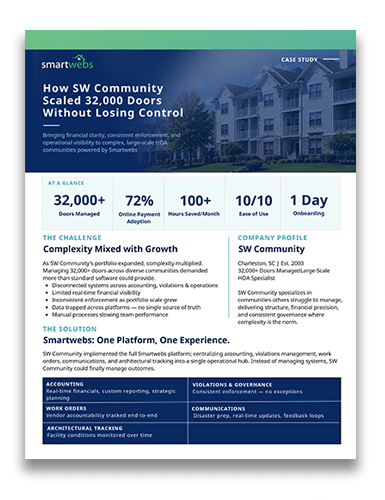
Consider a simple hypothetical example.
Imagine 20 employees each spend an average of 30 minutes per day on avoidable administrative work such as duplicate data entry, searching across systems, manipulating spreadsheets, or moving information between disconnected platforms.
That equals:
20 employees × 0.5 hours × 5 days × 50 weeks = 2,500 hours per year.
At an illustrative loaded labor cost of $40 per hour, that represents:
$100,000 in annual labor capacity.
That is not a Smartwebs customer result. It is simply an example of how small amounts of operational friction can compound across an organization.
But this problem isn’t only theoretical.
SW Community manages more than 32,000 doors using Smartwebs and reports saving 100+ hours every month. The company also reports 72% online payment adoption, a 10/10 ease-of-use rating, and one-day onboarding.
That’s more than 1,200 hours of reported operational capacity over the course of a year.
Read the SW Community case study
The larger point isn’t simply that technology can save time.
Efficiency saves time. Capacity creates room to grow.
Growth and Scale Are Not the Same Thing
An important difference exists between growing an HOA management company and scaling one.
Growth can mean adding communities, employees, revenue, and workload simultaneously.
Scaling means increasing the business without increasing resources and complexity at exactly the same rate.
That is where technology becomes strategic.
If every additional group of communities requires another set of spreadsheets, manual processes, reporting work, or administrative headcount, leadership should understand why.
The problem may not be the people.
It may be the operating system they have been given.
The executive question becomes:
Can our technology help us manage more communities without multiplying the work required to manage them?
That is a very different standard than asking whether software has accounting, violations, architectural review, communications, work orders, or reporting.
Most modern HOA platforms offer features.
The more important question is how well those capabilities work together.
Start With the Workarounds
One of the simplest ways to evaluate your current HOA software is to stop looking at its feature list.
Look at everything your employees have built around it.
How many spreadsheets are necessary to complete routine processes?
Where is information entered more than once?
Which reports must be exported and manipulated manually?
What information lives in email because the software doesn’t provide a practical place for it?
How many systems does a manager open during a normal day?
How many people need to become involved simply to answer a leadership question?
How often does accounting reconcile information that should already agree?
These workarounds reveal something feature comparisons often miss:
The actual cost of getting the work done.
They also provide leadership with a better framework for evaluating a new platform.
The goal should not simply be to reproduce the same processes in different software.
The goal should be to eliminate the reasons those workarounds existed in the first place.
Five Questions Leadership Should Ask Before Deciding to Stay
1. Are we adding people because we’re growing, or because our processes don’t scale?
Those are not the same kind of headcount.
Growth naturally requires talented people. But if we add employees mainly to do repetitive administrative work, reconcile disconnected information, build reports, or compensate for inefficient processes, technology may be driving the staffing need.
2. How much work happens outside our primary platform?
Spreadsheets, disconnected applications, manual reporting, duplicate entry, and email-based processes can all indicate operational friction.
The more work happens outside the primary system, the harder it becomes to maintain consistent processes and reliable information as the organization grows.
3. Can leadership see the business without asking someone to assemble the answer?
Executives need visibility.
Portfolio performance, financial information, operational activity, community trends, and exceptions should not require a scavenger hunt through systems and spreadsheets.
Leadership shouldn’t have to ask five people to find one number.
4. Could our current operating model support twice our portfolio?
Imagine twice the communities.
Twice the homeowner interactions.
More accounting activity.
More ARC requests.
More violations.
More work orders.
More communications.
More documents.
Would your current technology absorb that additional volume?
Or would your organization have to absorb it with more people and more processes?
5. What are we actually protecting by avoiding migration?
Avoiding disruption can feel like the safest choice.
But maintaining the status quo is still a business decision.
Leadership should compare the temporary risk and effort of implementation against the cumulative cost of operating inefficiently for another three, five, or ten years.
Migration Risk Is Real. It Should Also Be Manageable.
None of this means management companies should underestimate software migration.
Community management organizations may hold years of homeowner information, financial history, association documents, violations, architectural records, communications, vendor information, and operational data.
Moving that information deserves careful planning.
Before selecting a new platform, leadership should understand:
- What information can be migrated?
- How will the data be prepared?
- Who is responsible for validation?
- What historical information will remain accessible?
- What information should be cleaned before migration?
- What systems can be integrated?
- What resources are required internally?
- How will employees be trained?
- What happens before, during, and after go-live?
A strong implementation conversation addresses these questions early, not after a contract has been signed.
Migration Doesn’t Have to Mean Starting Over
Community Financials provides a useful real-world example. 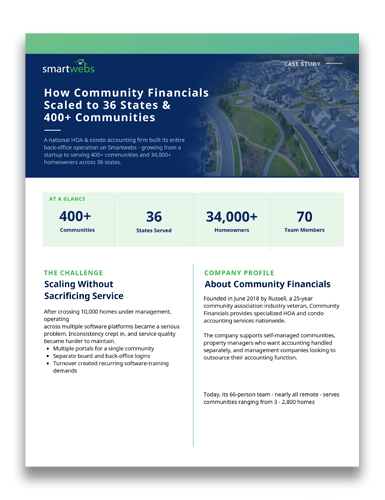
The national HOA and condominium accounting firm adopted Smartwebs in September 2022. Since then, it has migrated its entire customer base onto Smartwebs, including customers previously operating in Tops/Enumerate and Caliber/Frontsteps environments.
Today, Community Financials operates across approximately 400+ communities, 34,000 homeowners, and 36 states on Smartwebs.
That matters because migration and growth didn’t have to be opposing objectives.
The company continued expanding its national operation while consolidating its technology environment.
Founder and CEO Russell describes the relationship with Smartwebs as a partnership, highlighting the company’s willingness to listen to his experienced accounting team and evolve the platform based on their input.
Read the Community Financials case study
For leadership teams evaluating a switch, the lesson isn’t that every migration will look the same.
It’s that migration capability should itself be part of the software evaluation.
Financial Integrity Is Non-Negotiable
Accounting deserves particular attention during any HOA software conversion.
A migration plan should clearly address financial information such as:
- General Ledger balances
- Owner account balances
- Assessment and charge structures
- Open receivables
- Credits and prepaid balances
- Bank information
- Historical transactions
- Financial reports
- Audit trails
Before go-live, imported financial information should be validated against appropriate legacy reports.
Depending on the organization’s accounting structure, that may include Trial Balance reports, Accounts Receivable Aging reports, owner prepaid summaries, opening balances, and other records used by the accounting team.
But financial migration is not simply an accounting concern.
Financial discrepancies can affect homeowner trust, board confidence, reporting, audit readiness, and the management company’s reputation.
That makes financial integrity a business continuity requirement, not merely a data-transfer task.
The objective isn’t simply to move financial information.
It is to establish confidence that the organization begins operating in the new environment with accurate information.
Historical Data Still Matters
Changing HOA software should not mean abandoning the institutional history of the communities you manage.
Management companies should understand how a prospective platform handles historical information, including:
- Owner ledger history
- General Ledger transactions
- Architectural review records
- Violation histories
- Association documents
- Owner communications
- Community files
Historical information can remain important for operations, financial reporting, audits, homeowner questions, board requests, and future decision-making.
Ask what will move, what will remain accessible, and how employees will find it after implementation.
Don’t Just Migrate Data. Rethink the Work.
A successful software conversion should not simply recreate every old process inside a new platform.
That misses the opportunity.
If employees currently enter information twice, why?
If managers maintain separate spreadsheets, what problem are those spreadsheets solving?
If accounting has developed manual reconciliation processes, what created the need?
If leadership cannot easily see portfolio performance, where is that information trapped?
Migration creates an opportunity to ask a much more valuable question:
If we were designing this operation today, would we design it this way?
Often, the answer is no.
That is why implementation should involve the people who actually perform the work.
They know where the extra steps are.
They know which reports require manipulation.
They know where information gets lost.
They know which “temporary” spreadsheets became permanent years ago.
Those insights can help transform implementation from a software project into an operational improvement initiative.
Technology Should Create Capacity
The objective of modern HOA technology should not simply be digitization.
It should be capacity.
Managers should have more capacity to manage communities and relationships.
Accounting teams should have more capacity to analyze financial information instead of manually assembling it.
Leadership should have greater visibility without creating additional reporting work.
Employees should spend less time finding information and more time acting on it.
And as the portfolio grows, technology should help absorb increasing complexity rather than contribute to it.
That is where connected systems matter.
When accounting, community operations, communications, reporting, workflows, documents, automation, and intelligence operate in a connected environment, information can move with the work instead of employees constantly moving information between systems.
What Does Scalability Look Like in Practice?
Technology claims are easy to make.
Customer outcomes are more meaningful.
SW Community’s experience provides one example.
As its portfolio grew to more than 32,000 doors, disconnected accounting, violations, and operational systems created increasing complexity. Smartwebs brought accounting, violations management, work orders, communications, and architectural tracking into one operational environment.
Today, SW Community reports:
32,000+ doors managed
100+ hours saved each month
72% online payment adoption
10/10 ease of use
One-day onboarding
Owner and President Steven Wagner describes Smartwebs not simply as software, but as the foundation that enables the company to bring financials, compliance, and operations together while continuing to scale.
Community Financials offers another perspective on scale.
Its back-office operation now supports approximately 400+ communities and 34,000 homeowners across 36 states on Smartwebs.
Different organizations. Different operating models.
But the same larger question:
Can the technology support increasing complexity without becoming the source of it?
That is the standard executives should be evaluating.
The Bigger Risk Isn’t Always the Change
Every software transition carries risk.
But staying is also a decision.
And it carries a cost.
If your organization is compensating for its technology with additional people, spreadsheets, manual reconciliation, disconnected systems, and increasingly complicated processes, those costs don’t disappear because they’re difficult to see on a budget line.
They compound as the portfolio grows.
The risk equation therefore has two sides.
There is the short-term risk of change.
And there is the long-term risk of continuing to operate around technology the organization has already outgrown.
So perhaps the most useful question isn’t:
“How difficult will it be to switch HOA software?”
It is:
“What will our current operating model cost us if we don’t?”
Don’t Just Compare Software. Compare the Business You Can Build With It.
The right HOA platform should do more than replace existing software.
It should help remove the operational limitations that made leadership consider replacing it in the first place.
Before switching HOA software, document the workarounds.
Understand the financial requirements.
Evaluate your data.
Talk to the employees performing the work.
Determine what needs to become easier.
Then look further ahead.
Ask what your organization should look like at twice its current size.
Ask what information leadership needs to make decisions.
Ask where technology could create capacity instead of consuming it.
Ask which processes should disappear rather than simply move.
Then evaluate software against that standard.
At Smartwebs, we bring community operations, accounting, workflows, communications, reporting, automation, and AI into one connected environment designed for community association management.
One Platform. One Login. One Unified Experience.
What Would Your Operation Look Like Without the Workarounds?
Bring us the processes your team has built around your current software: the spreadsheets, manual reconciliations, duplicate entry, disconnected workflows, and reporting challenges.
We’ll show you how those same processes can work in one connected Smartwebs environment.
See Smartwebs in action.
Frequently Asked Questions About Switching HOA Software
How difficult is it to switch HOA management software?
The complexity depends on portfolio size, data quality, accounting requirements, integrations, workflows, historical information, and available internal resources. A strong implementation plan should define those requirements before migration begins and establish clear responsibilities for data preparation, validation, training, and go-live.
What should a CEO consider before switching HOA software?
Leadership should evaluate more than features. Consider operational efficiency, staffing requirements, financial controls, portfolio visibility, scalability, migration risk, implementation resources, and whether the current platform can support future growth without creating proportionally more administrative work.
Can existing HOA data be moved to new software?
Often, yes, although the amount and type of information that can be migrated varies by platform and source system. Management companies should ask specifically about homeowner records, financial history, documents, violations, architectural records, communications, association information, and other historical data important to operations.
What happens to accounting records when changing HOA software?
Accounting migration should be carefully planned and validated. Management companies should determine which balances, transactions, bank information, owner records, historical financial information, and reports will move and how imported information will be reconciled against the legacy system before go-live.
How long does HOA software implementation take?
There is no universal implementation timeline. Portfolio size, data complexity, accounting configuration, integrations, training requirements, migration scope, and available internal resources can all affect the schedule. Ask for an implementation plan based on your actual operation rather than relying on a generic estimate.
How can management companies prepare employees for new HOA software?
Focus on workflows rather than simply teaching employees where features are located. Identify existing workarounds, involve employees who understand current processes, provide role-specific training, and demonstrate which manual steps the new platform is intended to eliminate.
When should a management company consider changing HOA software?
Common indicators include duplicate data entry, excessive manual processes, disconnected systems, heavy spreadsheet use, limited reporting, difficulty accessing portfolio-level information, increasing administrative headcount, and technology that makes growth increasingly difficult to manage.
How should management companies compare HOA software?
Feature comparisons are useful, but leadership should also compare workflows, accounting capabilities, integrations, migration support, reporting, automation, implementation resources, scalability, and documented customer outcomes.
The larger question isn’t simply which platform has the longest feature list.
It is which platform best supports the operating model the organization is trying to build.
